
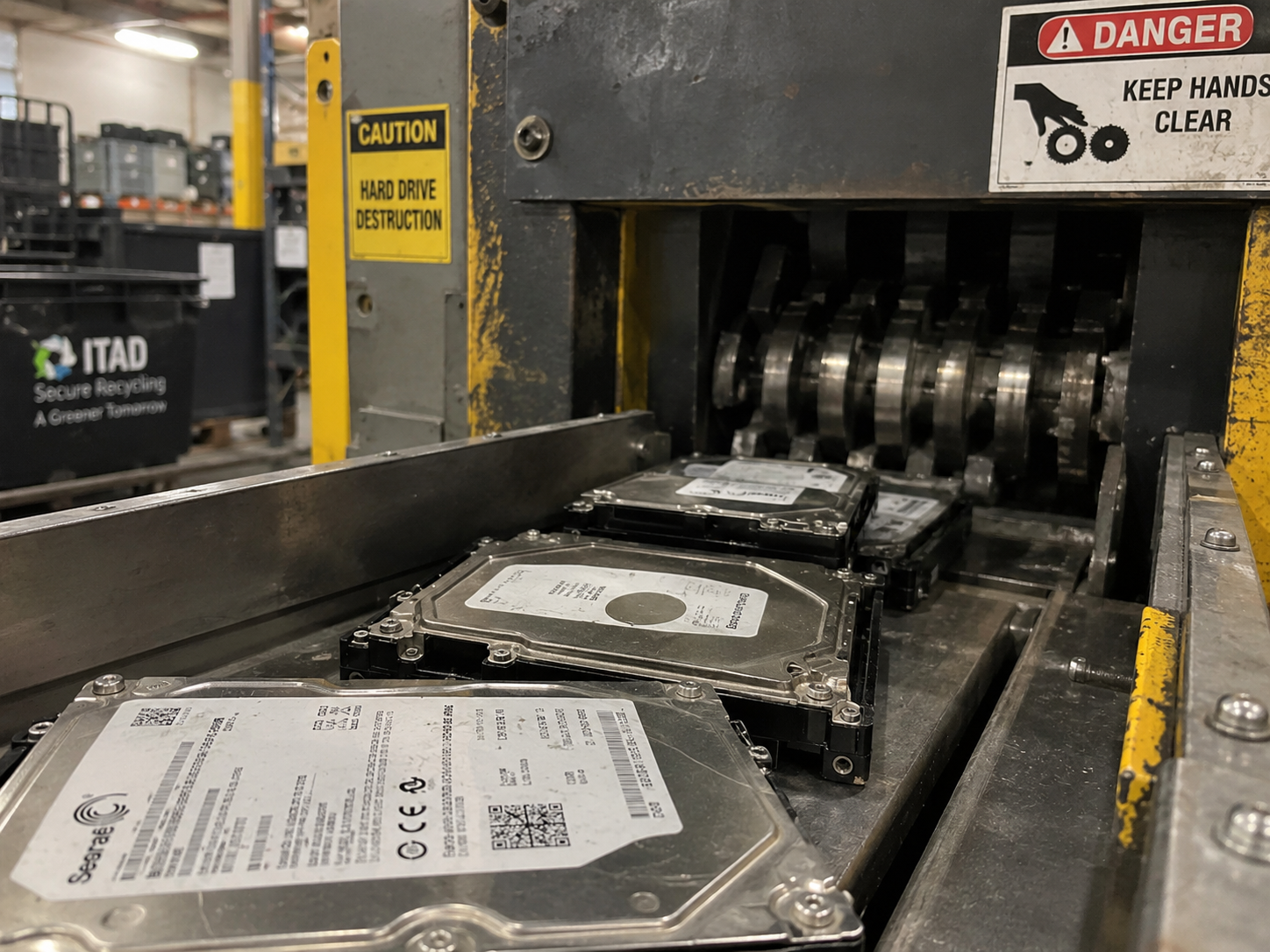
Hard drive shredding, also called hard drive destruction, is a physical data destruction method that feeds a drive through industrial cutting shafts until its platters or memory chips are strips or particles that cannot be read. It is one Destroy method under NIST SP 800-88 Revision 2. Wipe the drives you can verify. Shred the drives you cannot.
Under NIST SP 800-88 Revision 2, a verified Purge-level wipe makes data unrecoverable even in a forensics lab, leaves the drive usable, and is accepted under HIPAA, PCI DSS, and CMMC. Physical shredding is required when a drive has failed, holds classified data, or a contract or internal policy demands destruction. Most organizations need both methods, applied drive by drive through a written decision rule.
This guide covers the security, compliance, cost, environmental, and operational trade-offs between logical wiping (data sanitization) and physical shredding (destruction) for hard disk drives (HDDs) and solid-state drives (SSDs). It does not cover tape, optical media, or cloud storage. It is written for IT asset managers, compliance officers, and procurement leads at small and mid-sized organizations who are retiring storage devices and need a disposal policy they can defend to an auditor.
How Does Hard Drive Shredding Work?
A commercial hard drive shredding job has six steps. This is the industry-standard process, and it is the same whether a vendor runs it in a fixed facility or in a mobile unit parked at the customer’s site.
- Drives are logged by serial number, separate from the serial number of the computer they came out of.
- Drives move in locked, tamper-evident containers to the shredding floor, or a vendor’s mobile unit processes them where they sit.
- Interlocking steel shafts cut the casing, platters, and circuit boards into strips 1.5 to 2 inches wide. For SSDs, a disintegrator reduces the media to particles 2 mm across or smaller.
- Magnets and eddy-current separators split steel from aluminum and circuit board fragments.
- The fragments go to a smelter for metal recovery.
- The vendor issues a certificate of destruction that lists each drive by serial number.
The cutting takes seconds per drive. The logging before it and the certificate after it are what make the shred provable.
Who Provides Hard Drive Shredding Services?
Three kinds of vendors sell hard drive shredding services: document-shredding companies that added media destruction, IT asset disposition (ITAD) providers that shred alongside sanitization and resale, and certified electronics recyclers. For business data, the credentials that matter are NAID AAA certification of the destruction process and a serialized certificate of destruction for every drive.
Human-I-T, a NAID AAA certified nonprofit ITAD provider, has two services for retired drives: Physical Hard Drive Destruction and Corporate Grade Data Sanitization.
The difference between vendor types matters more than it looks. A document shredder destroys whatever you hand it. An ITAD provider can also test, wipe, and resell or donate the drives that do not need to be destroyed, which is where most of the value in this decision sits.
What Is the Difference Between Wiping and Shredding a Hard Drive?
Wiping removes the data and keeps the drive. Shredding removes the data by destroying the drive. NIST SP 800-88 Revision 2, Guidelines for Media Sanitization, finalized September 26, 2025 and superseding Revision 1 (2014), defines three sanitization levels: Clear, Purge, and Destroy. Wiping covers Clear and Purge. Shredding is one Destroy method. Vendors sell all three levels as “secure data destruction”. NIST calls it media sanitization.
Clear is a logical sanitization level that overwrites every user-addressable location with non-sensitive data. It defeats recovery software that works through the drive’s normal interface. Revision 2 confirms that a single-pass overwrite is sufficient for modern HDDs. The multi-pass wipes of the retired DoD 5220.22-M method add no security and wear the drive down.
Purge is a sanitization level that makes data recovery infeasible even with laboratory techniques such as electron microscopy or magnetic force microscopy. It reaches locations that Clear cannot, including remapped and over-provisioned sectors. A purged drive is still a working drive.
Destroy is a sanitization level that makes the media permanently unusable. Methods include shredding, disintegration, pulverization, incineration, and melting. A destroyed drive goes to metal recovery.
Two companion standards fill in the details. IEEE 2883-2022 specifies the exact controller commands that achieve a true Purge on modern drives, including ATA Sanitize, NVMe Sanitize, and Cryptographic Erase. NIST Revision 2 removed its old media-specific tables and points to IEEE 2883 for the technical steps. ISO/IEC 27040:2024 uses the same three tiers for international programs.
| Level | What it does | Drive afterward | Typical use |
|---|---|---|---|
| Clear | Overwrites user-addressable storage through the normal interface | Fully usable | Low-sensitivity data on drives redeployed inside the same security boundary |
| Purge | Firmware block erase, cryptographic erase, or degaussing of magnetic media | Fully usable | Any drive leaving the organization’s control: resale, donation, lease return, recycling |
| Destroy | Shredding, disintegration, incineration, melting | Permanently unusable | Classified data, failed drives, drives that cannot be verified, contract mandates |
Should You Shred or Wipe Old Hard Drives?
Wipe any working drive that leaves your control. Shred any drive you cannot wipe and verify. NIST recommends Purge or Destroy for moderate and high sensitivity data leaving organizational control, which includes drives sold, donated, returned off lease, or sent to a recycler. Clear is acceptable only for low-sensitivity data on drives that stay inside the same security boundary.
Shred when any one of these is true:
- The drive has failed, will not mount, or will not accept the Purge command.
- The Purge result cannot be verified on that specific drive.
- The data is classified or falls under a zero-tolerance internal risk classification.
- A customer contract, cyber-insurance rider, or written internal policy names physical destruction.
The most common objection to wiping is the fear that wiped data comes back. NIST answers it directly. Purge renders data unrecoverable “even when subjected to state-of-the-art laboratory attacks such as electron microscopy or magnetic force microscopy.” That is the bar a Purge has to clear before it can be called a Purge.
Do HIPAA, PCI DSS, or CMMC require physical destruction?
No. All three accept verified sanitization as equal to destruction. Each rule is technology-neutral. Each asks one question: is the data unrecoverable? None of them asks whether the hardware still exists.
| Regulation | Operative text | Does it accept wiping? |
|---|---|---|
| HIPAA Security Rule | 45 CFR 164.310(d)(2)(i) and (ii) govern disposal and media re-use of ePHI. HHS Office for Civil Rights guidance lists clearing, purging, or destroying as acceptable methods. | Yes |
| PCI DSS v4.0 | Requirement 9.4.7 requires electronic media holding cardholder data to be destroyed, or the data rendered unrecoverable so it cannot be reconstructed. The current text is in the PCI SSC document library. | Yes |
| CMMC 2.0 and NIST SP 800-171 | MP.L1-3.8.3 requires contractors to “sanitize or destroy” media holding Federal Contract Information before disposal or reuse. MA.L2-3.7.3 requires equipment sent off site for maintenance to be sanitized of CUI. Level 3 adds no new sanitization rule. | Yes |
Published HHS enforcement actions on disposal involve devices that were never sanitized or whose sanitization was undocumented. The regulatory question is whether you can prove the data is gone.
Contracts are a different matter. Customer agreements, cyber-insurance policies, and data processing addenda sometimes specify physical destruction. Read them before you set a default. If they say destroy, shred those drives and document why.
Can You Wipe or Shred an SSD the Same Way as a Hard Drive?
No. Software overwriting and degaussing do not sanitize SSDs. Solid-state and self-encrypting drives need firmware Sanitize or Cryptographic Erase commands to reach Purge, and shredding them requires far smaller particles than an HDD needs.
Software overwrites cannot Purge an SSD. SSD controllers use wear-leveling to spread writes across cells and keep over-provisioned reserve blocks the host cannot address. A host-level overwrite, including DBAN and every operating system format, reaches only the currently mapped sectors. Data in remapped, retired, or over-provisioned blocks stays put. IEEE 2883 classifies a host overwrite on an SSD as Clear at best.
SSDs and NVMe drives reach Purge through controller commands. ATA Sanitize Block Erase, NVMe Sanitize Block Erase, and NVMe Sanitize Crypto Erase operate at the NAND level, below the flash translation layer. Block Erase zeroes every erase block, including reserves, in seconds to minutes. The host can watch progress through the drive’s sanitize log page.
Cryptographic Erase (CE) is a Purge method for self-encrypting drives that destroys the Media Encryption Key so the stored ciphertext can never be decrypted. On FIPS 140-3 validated drives, the key is zeroized. Terabytes become noise in seconds. CE depends on the vendor’s cryptographic implementation, so verification is still required.
Degaussing has no effect on flash. A degausser scrambles magnetic domains. SSDs, USB drives, memory cards, and embedded storage hold data as electrical charges in NAND cells. Running an SSD through the strongest NSA-listed degausser leaves the data intact.
Degaussing is also less dependable on the newest HDDs. Heat-assisted (HAMR) and microwave-assisted (MAMR) drives use platters with coercivity so high that a normal write head cannot flip them at room temperature. Standard commercial degaussers may not reliably sanitize HAMR and MAMR drives. For those drives, use cryptographic or block erase, or physical destruction.
| Media | Overwrite | Degauss | Firmware Purge (Block or Crypto Erase) | Shred |
|---|---|---|---|---|
| Conventional (PMR) HDD | Clear, single pass is sufficient | Purge | Purge, if the drive supports the command | Destroy |
| HAMR or MAMR HDD | Clear | Unreliable | Purge | Destroy |
| SATA or NVMe SSD | Clear only | No effect | Purge | Destroy, only at 2 mm or smaller |
| Self-encrypting drive (SED) | Clear only | No effect on flash SEDs | Purge (Crypto Erase) | Destroy |
Is Shredding a Hard Drive Enough to Destroy the Data?
For a conventional HDD, yes. For an SSD, only if the particles are small enough. A standard 1.5 to 2 inch shredder destroys HDD platters but lets intact SSD memory chips through, where chip-off recovery can read them. An attacker desolders the NAND package, mounts it on a donor board, and reads the raw data.
Two published standards set the particle sizes that stop it.
DIN 66399 classifies media by type and assigns seven security levels. For sensitive business data, HDDs need H-5 (particles no larger than 320 mm²). SSDs need E-6 (1 mm²) or E-7 (0.5 mm²).
The NSA/CSS Evaluated Products List, published with the NSA’s media destruction guidance, requires classified SSDs and flash media to be reduced to a nominal edge length of 2 mm or less by an evaluated disintegrator. Classified HDDs must be degaussed with an evaluated degausser first, then physically deformed.
IEEE 2883-2022 lists incineration and melting as its Destruct methods and warns that shredded high-density media can retain recoverable data. Shredding is still widely used and accepted under NSA and DIN rules. The direction of the standards is plain: for SSDs, a certified Purge is the primary method and destruction is the backstop.
| Media | Standard shredder (1.5 to 2 in.) | DIN 66399 minimum | NSA/CSS EPL |
|---|---|---|---|
| HDD | Adequate for conventional platters | H-5, 320 mm² | Degauss, then deform |
| SSD or flash | Inadequate, chip-off risk | E-6, 1 mm² or E-7, 0.5 mm² | 2 mm edge or smaller |
If your vendor shreds SSDs, the equipment’s DIN or NSA rating is the proof. Our hard drive destruction vendor guide lists the questions to ask.
What Is a Certificate of Destruction and What Must It Include?
A certificate of destruction is a per-device record that ties one drive’s serial number to the method used, the date and time, the tool, the standard applied, and the technician who signed off. For wiped drives the same document is called a certificate of sanitization. Either method is only defensible with this record. Auditors, insurers, and breach investigators accept wiping when the paper trail proves it happened to each specific drive. They reject shredding when the paper trail is a pallet count.
A batch certificate for “one pallet of drives” gives an auditor nothing to check. Record the storage drive’s serial number, and the host device’s serial or asset tag as well. Drives get swapped and removed during a device’s life.
NIST separates two checks that programs often blur. Verification is a device-level check that the tool finished its task on this drive without errors, for example by reading back sectors or confirming the sanitize log. Validation is a program-level decision that the chosen method works for this class of hardware. Both are required.
Chain of custody is the documented handoff of each drive from your loading dock to the vendor’s floor: a serialized inventory before pickup, locked and tracked transport, and a second count at intake reconciled against your manifest. Your organization performs the first count. A vendor that tells you what you shipped has a conflict of interest, and independent counts are the point of an audit trail. Our hard drive destruction vendor guide has the full chain-of-custody checklist.
How Much Does Hard Drive Shredding Cost?
Off-site hard drive shredding runs $4 to $15 per drive in published 2025 to 2026 U.S. vendor pricing, on-site shredding $10 to $40 per drive plus $90 to $300 job minimums, and certified wiping $10 to $25. Wiping costs more per drive but leaves a resalable asset. Shredding leaves scrap.
These are market ranges compiled from published ITAD vendor pricing. A quote will depend on volume, location, and whether the drives arrive loose or still inside computers.
| Method | Off-site cost per drive | On-site cost per drive | High-volume rate | Residual asset value |
|---|---|---|---|---|
| Certified Purge (software wipe) | $10 to $25 | Software, no transport premium | $5 to $10 at 100 or more drives | Preserved |
| Degaussing (HDD only) | $10 to $25 | Equipment-based | Under $10 | Destroyed |
| Physical shredding | $4 to $15 | $10 to $40 plus $90 to $300 minimums | About $4 at 250 or more drives | Scrap only |
On-site shredding carries a 50 to 100 percent premium over off-site processing to cover the truck, crew, and fuel. Wiping is slower per drive. A multi-terabyte HDD can take hours to overwrite and verify. A firmware Purge on an SSD takes seconds to minutes.
What is a wiped drive worth?
Enterprise SSDs hold a third to a half of their new price on the used market as of September 2026. Small mechanical drives are close to worthless. The table shows market ranges from secondary-market listings.
| Drive | Capacity | Approximate new price (2026) | Used price (2026) | Value retained |
|---|---|---|---|---|
| Enterprise SATA SSD | 960 GB | $105 | $35 to $50 | 33 to 48% |
| Enterprise SATA SSD | 3.84 TB | $280 | $110 to $150 | 39 to 54% |
| NVMe U.2 SSD | 1.92 TB | $200 to $220 | $70 to $115 | 35 to 52% |
| NVMe U.2 SSD | 3.84 TB | $390 to $410 | $150 to $220 | 37 to 56% |
| Laptop or SAS HDD | Under 2 TB | End of life | $3 to $15 | Terminal |
For a sub-2 TB HDD, the labor, software, and shipping to wipe and resell it cost more than it earns. Shredding or bulk recycling is the rational path. For an enterprise SSD, the math flips. Shredding a working 1.92 TB NVMe drive costs about $12 and returns nothing. Purging it costs about $10 and returns roughly $100 in resale, a swing of about $90 per drive. Across a 500-drive refresh, that is about $45,000.
Whole devices follow the same curve. Market ranges put a business laptop retired within three to four years of deployment at $120 to $450 resale, and servers and workstations at $400 to $800 or more. Industry estimates put depreciation at 2 to 4 percent per month after year four. Waiting costs money.
Is shredding or wiping better for the environment?
Wiping, whenever the drive still works. A peer-reviewed lifecycle study by Tannu and Nair, “The Dirty Secret of SSDs: Embodied Carbon” (2022), puts the lifetime footprint of a 1 TB SSD at about 369 kg CO₂e, against about 199 kg for a 1 TB HDD. Most of an SSD’s footprint is in fabrication. Destroying a working drive forces the manufacture of its replacement, and that carbon is spent a second time.
The UN Global E-waste Monitor 2024 reports that the world generated 62 million tonnes of e-waste in 2022, up 82 percent since 2010, and that only 22.3 percent was documented as formally collected and recycled. Generation is projected to reach 82 million tonnes by 2030. The United States generates an estimated 6.9 million tonnes a year, about 46 pounds per person.
For Scope 3 reporting, the honest framing has two parts. Reusing or donating a sanitized drive instead of shredding it lowers the waste line in Category 5 (waste generated in operations) for that asset. The emissions avoided by displacing a newly manufactured drive can be reported alongside that figure. Do not net the two against each other.
Reuse does not have to mean resale. Sanitized computers can be donated to a nonprofit refurbisher and reach people who do not have a working device. That is the path Human-I-T runs through its technology donation program. Our guide to choosing between recycling, donation, and resale covers when each path fits.
What Does “Certified Hard Drive Destruction” Mean?
Certified hard drive destruction means the destruction process itself has been audited by an independent body and the result is documented per drive. In the United States, the certification that covers this is NAID AAA. Recycling certifications cover something different.
R2v3 (SERI) and e-Stewards (Basel Action Network) certify responsible recycling and downstream tracking of materials. NAID AAA (i-SIGMA) certifies the data destruction process itself: unannounced audits, 90-day CCTV retention, employee background checks, and written destruction procedures. Certified hard drive destruction means the second. A data-bearing engagement needs both kinds. Our explainer on NAID AAA, R2v3, and ISO standards covers what each audit checks.
NIST does not certify anyone. NIST publishes guidelines. It does not audit or certify companies. A vendor that markets itself as “NIST certified” is misstating its credentials. The accurate claim is “NIST-aligned”, backed by NAID AAA or R2v3 certificates from the bodies that do audit.
Human-I-T is a U.S.-based, NAID AAA certified nonprofit IT asset disposition (ITAD) provider. It has two services for retired drives: Corporate Grade Data Sanitization for drives that can be wiped and reused, and Physical Hard Drive Destruction for drives that have failed, cannot be verified, or must be destroyed by policy. Sanitized devices are refurbished and placed with people who lack a working computer. The full scope is on our secure, certified ITAD services page.
For a scoring checklist covering certifications, chain of custody, and certificate contents, use our hard drive destruction vendor guide.
How Do You Write a Hard Drive Disposal Policy?
Route each drive by a written rule. “Shred everything” destroys value and adds e-waste. “Wipe everything” ships unverifiable drives out the door. A mixed policy assigns the method per asset from four inputs: media type, data classification, drive health, and any contract or regulatory flag.
The decision rule
- Classify the data on the drive as low, moderate, or high sensitivity, and note any classified or contract-mandated flag.
- Identify the media: conventional HDD, HAMR or MAMR HDD, SSD, NVMe, or self-encrypting drive.
- Test drive health. A drive that fails S.M.A.R.T. thresholds, will not mount, or will not accept the Purge command goes to Destroy.
- Check the value threshold. A drive worth less than the cost to wipe and resell it goes to Destroy or bulk recycling, unless it is a donation candidate.
- Everything else goes to Purge using the IEEE 2883 command for its media type, followed by verification.
- Record the outcome for every drive by serial number.
What happens during a hard drive destruction engagement?
Certified vendors run a mixed engagement in a fixed sequence:
- Inventory and serialized tagging at your site, including the drive serials.
- Separation of duties between the person who retires hardware and the person who verifies the outbound count.
- Secure logistics in sealed bins on GPS-tracked vehicles.
- Intake reconciliation against your manifest, with variances escalated at once.
- Triage. Functional drives with non-classified data go to the sanitization array, where sanitization software issues the IEEE 2883 Purge command.
- Verification. A sample or 100 percent of wiped drives are checked. Any drive that fails to boot, mount, or verify is pulled and routed to shredding.
- Grading and disposition. Sanitized hardware is graded, typically under the R2v3 REC framework, and routed to resale, refurbishment, or donation.
- Reporting. You receive a serialized certificate of sanitization for wiped drives, a serialized certificate of destruction for shredded drives, and environmental and financial settlement reports.
The objection to a mixed policy is that it sounds complicated. In practice the vendor performs the routing, processing, and documentation. Your job is to write the rule, perform the independent outbound count, and audit the certificates against your ledger.
No public body publishes a fill-in-the-blank template that merges wipe-and-shred business logic with IEEE 2883 execution steps. NIST SP 800-88 Rev. 2 Appendix A supplies the sanitization decision matrix by media type. R2v3 Appendix B requires certified facilities to hold a documented sanitization plan aligned to NIST 800-88. Organizations combine those two with their own data classification scheme to produce the policy above.
Decision Framework: Wipe vs. Shred
| Decision variable | Wipe (Purge-level sanitization) | Shred (physical destruction) |
|---|---|---|
| Data sensitivity | Low to high sensitivity on functional drives | Classified data, or destruction named by regulation, contract, or policy |
| Media type | HDDs by overwrite or degauss; SSDs and NVMe by firmware Sanitize; SEDs by Cryptographic Erase | Failed, locked, or unresponsive drives; SSDs whose Purge cannot be verified; HAMR or MAMR drives when degaussing is the only non-logical option |
| Compliance and audit acceptance | Accepted under NIST SP 800-88 Rev. 2, IEEE 2883-2022, ISO/IEC 27040:2024, HIPAA, PCI DSS v4.0, and CMMC 2.0 when documented per serial | Required by NSA/CSS EPL for classified media; sometimes required by customer contracts or insurance riders |
| Asset value recovery | Drive stays functional and resalable or donatable | Scrap metal value only |
| Environmental impact | Extends device life; lowers the Category 5 waste line; avoided manufacturing emissions reported alongside | Generates e-waste; justified when security requirements outweigh reuse |
| Particle-size requirement | Not applicable | HDD: DIN 66399 H-5 (320 mm²); SSD: DIN 66399 E-6 (1 mm²) or NSA EPL (2 mm edge) |
| Default rule | Default for all functional drives with non-classified data leaving your control | Escalate when the drive has failed or is locked, the data is classified, a contract or regulation names destruction, or Purge verification fails |
Frequently Asked Questions
What is hard drive shredding?
Hard drive shredding is a physical destruction method that cuts a drive into strips or particles so its platters or memory chips cannot be read. It is one way to meet the NIST SP 800-88 Destroy level. Standard shredders cut 1.5 to 2 inch strips, which is adequate for conventional HDD platters. SSDs need disintegration to 2 mm or smaller.
How much does it cost to shred a hard drive?
Published market ranges for 2025 to 2026 run $4 to $15 per drive for off-site shredding and $10 to $40 per drive for on-site shredding, often with a $90 to $300 minimum. High-volume off-site jobs can fall to about $4 per drive. Certified wiping runs $10 to $25 per drive, or $5 to $10 at volume, and leaves the drive resalable.
Does HIPAA require hard drive shredding?
No. HIPAA requires that ePHI be rendered unusable, unreadable, and indecipherable before disposal or reuse. HHS Office for Civil Rights guidance names clearing, purging, and destroying as acceptable methods. A verified wipe with a serialized certificate satisfies the rule.
Does degaussing work on SSDs?
No. Degaussing has no effect on flash memory because SSDs store data as electrical charges, not magnetic domains. The primary sanitization method for SSDs is a firmware Purge: ATA Sanitize, NVMe Sanitize Block Erase, or Cryptographic Erase. Physical destruction of an SSD requires particles of 2 mm or smaller.
What particle size does SSD shredding require?
DIN 66399 level E-6 (particles no larger than 1 mm²) or E-7 (0.5 mm²) for sensitive business data, and a nominal edge length of 2 mm or less under the NSA/CSS Evaluated Products List for classified media. A standard 1.5 to 2 inch HDD shredder does not meet either.
What happens to shredded hard drives?
Shredded drives become mixed scrap: aluminum and steel casings, glass or aluminum platter fragments, and printed circuit board pieces. A certified recycler separates the metals for recovery. No resale value remains, and the certificate of destruction is the only record that the drive existed.
Can we accept a batch certificate of destruction for a pallet of drives?
No. A defensible certificate lists each drive’s serial number with the method, date and time, tool, standard, and technician signature. A batch certificate gives an auditor or breach investigator nothing to check.
How do you dispose of old hard drives?
Sanitize or destroy the data first under NIST SP 800-88. Route working drives to reuse, resale, or donation, and destroyed drives to an R2v3 or e-Stewards certified recycler for metal recovery. Keep the serialized certificate. It is the only proof the drive existed and was handled.
Do you need a local hard drive shredding company?
Usually not. Off-site shredding under a documented chain of custody is the norm for most business volumes, and the certificate matters more than the zip code. If you want a nearby provider, i-SIGMA’s member directory lists NAID AAA certified companies by state.
Can we donate computers after wiping or removing the drives?
Yes. A device whose drive has been purged can be donated whole. A device whose drive has been removed and shredded can be donated as a chassis and rebuilt with a new drive. Ask the receiving organization how it documents sanitization on intake. Our secure IT equipment donation guide covers the steps.
Next Steps
Ready to set a mixed wipe-and-shred policy? See how Human-I-T’s data destruction services cover sanitization and physical destruction.
Retiring servers and storage at scale? Learn how our data center decommissioning and ITAD services handle high-volume drive retirement.
Still choosing a vendor? Use our guide to hard drive destruction services to score candidates on certifications, chain of custody, and certificates.
Related Reading
- What is ITAD? Your Guide to IT Asset Disposition
- Is a Factory Reset the Same as Data Destruction?
- 7 Methods of Secure Data Sanitization
- Beyond Data Destruction: Why Data Sanitization Is Your First Line of Defense
- How Do ITAD Providers Ensure Complete Data Erasure?
Sources
- NIST SP 800-88 Revision 2, Guidelines for Media Sanitization, finalized September 26, 2025. https://csrc.nist.gov/pubs/sp/800/88/r2/final
- IEEE 2883-2022, Standard for Sanitizing Storage. https://standards.ieee.org/ieee/2883/10277/
- NSA/CSS Media Destruction Guidance and Evaluated Products Lists. https://www.nsa.gov/Resources/Media-Destruction-Guidance/
- DIN 66399, Office machines, destruction of data carriers (Parts 1 to 3). Deutsches Institut für Normung.
- 45 CFR 164.310(d)(2), HIPAA Security Rule, device and media controls. https://www.ecfr.gov/current/title-45/subtitle-A/subchapter-C/part-164/subpart-C/section-164.310
- HHS Office for Civil Rights, FAQ 575: What do the HIPAA Privacy and Security Rules require of covered entities when they dispose of PHI? https://www.hhs.gov/hipaa/for-professionals/faq/575/what-does-hipaa-require-of-covered-entities-when-they-dispose-information/index.html
- PCI Security Standards Council, PCI DSS v4.0, Requirement 9.4.7. https://www.pcisecuritystandards.org/document_library/
- NIST SP 800-171 Revision 2, controls 3.8.3 and 3.7.3, and the CMMC 2.0 model. https://csrc.nist.gov/pubs/sp/800/171/r2/upd1/final and https://dodcio.defense.gov/CMMC/
- UN Global E-waste Monitor 2024. https://ewastemonitor.info/the-global-e-waste-monitor-2024/
- Tannu, S., and Nair, P. J. “The Dirty Secret of SSDs: Embodied Carbon,” 2022. https://arxiv.org/abs/2207.10793
- i-SIGMA, NAID AAA Certification program and member directory. https://isigmaonline.org/
- Cost and resale figures: market ranges compiled from published ITAD vendor pricing and secondary-market listings, 2025 to 2026.